
In this tutorial will be covering how to make "Upload-attach multiple files" feature, like gmail has, with Contact Form 7 Wordpress plugin.
  <p class="hide_this">[file file-01]</p>
  <p class="hide_this">[file file-02]<a class="del_file" href="#">del</a></p>
  <p class="hide_this">[file file-03]<a class="del_file" href="#">del</a></p>
  <p class="hide_this">[file file-04]<a class="del_file" href="#">del</a></p>
  <p class="hide_this">[file file-05]<a class="del_file" href="#">del</a></p>
  <a href="#" class="add_file">Add file</a>
We set 5 (you can do more, of course) inputs and links to "add" and "delete". Also we added some markup. You can see this step in a screen below (clickable):
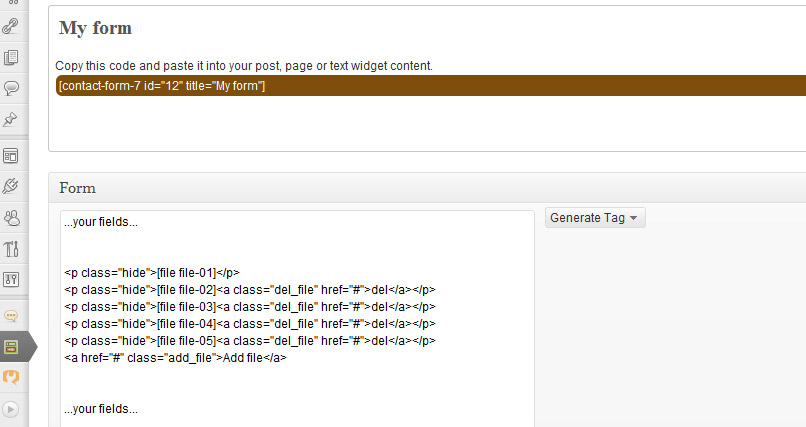
You can see this step in a screen:

<script type="text/javascript">
  jQuery(document).ready(function($){

    //hide all inputs except the first one
    $('p.hide_this').not(':eq(0)').hide();

    //functionality for add-file link
    $('a.add_file').on('click', function(e){
      //show by click the first one from hidden inputs
      $('p.hide_this:not(:visible):first').show('slow');
      e.preventDefault();
    });

    //functionality for del-file link
    $('a.del_file').on('click', function(e){
      //var init
      var input_parent = $(this).parent();
      var input_wrap = input_parent.find('span');
      //reset field value
      input_wrap.html(input_wrap.html());
      //hide by click
      input_parent.hide('slow');
      e.preventDefault();
    });
  });
</script>
This script is rather self-documented.
We can put this script in one of our theme's files. For example, you can put jquery-code, mentioned above, in footer.php. Also, you can do some css-styling but this is very specific in each particular case and this tutorial is not about that. The real example you can see on one of my project's site
Here I described the main idea of how to implement the multiple-file uploading feature, so, maybe there is a more easy way to do this. If so, feel free to write on kg69design@gmail.com
English is not my native language, sorry for some possible mistakes.